AI Should Be Doing Things for You
It's not difficult, the crux of the process is being able to tell it what you want, but that is a skill to work on. Here's how I made the transition and some things for you to try.

A year ago I was using AI the same way most people do, as a slightly better search engine. Ask a question, read the answer, go back to whatever I was doing. Sometimes useful. Never life-changing, ok that might be a little over the top.
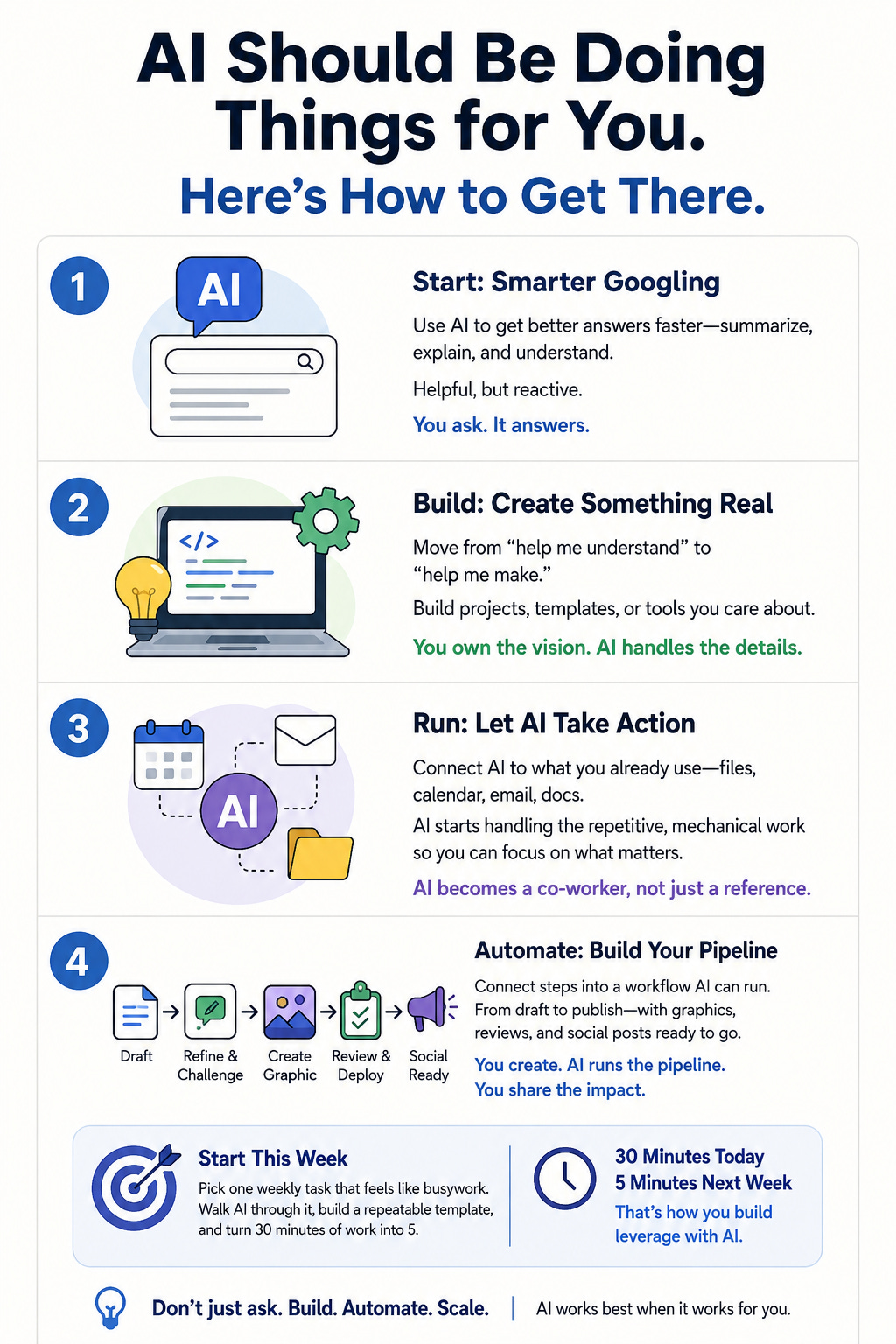
Today, my blog post workflow runs almost end to end without me managing every step. I write a draft, hand it to a custom skill that challenges my thinking and cleans the language, get a graphic generated from the post text itself, run it through a final review skill, and have it deployed to my substack. I still do the creative part including final edits. AI handles the pipeline around it.
That shift took about 3 months. I don’t say that to discourage you, it’ll probably take you less time if you know the stages to move through. But I want to be honest: it wasn’t an overnight flip, and I didn’t follow a roadmap. I built one by stumbling through it. Plus I read a ton of articles from authors of substack channels focused on making AI as effective and efficient for us using Claude, Gemini, etc. “Standing on the shoulders of Giants” seems to be an appropriate view.
Why “chatting with AI” isn’t the ceiling
You’ve probably heard the word “agentic” floating around AI news lately. It sounds technical and a little ominous, like AI is plotting something. What it actually means is simpler: AI that takes actions, not just AI that answers questions.
Most people are in question-and-answer mode. That’s not wrong, it’s genuinely useful. But it’s also about 10% of what’s available to you. The question-and-answer version of AI is still you doing everything. You ask, it answers, you read it, you decide what to do, you do the thing. The agentic version starts taking some of those middle steps off your plate. Not the thinking part, that’s still yours, but the mechanical, repetitive, “why does this take me 45 minutes every week” part.
Here’s how I got from one to the other, and more importantly, where I think a non-technical person could start today without any of the technical baggage I carried along the way.
Where I actually started: smarter Googling
My first real use of AI was mostly about getting better answers faster. Explaining something I’d read. Summarizing a long document. Helping me understand a contract without calling a lawyer. This is where most people live, and it’s legitimately useful.
But it’s also reactive. You only get what you ask for, and you have to know what to ask. AI is just a smart answer machine at this stage, helpful, but you’re still doing all the legwork around it.
The thing that shifted my thinking was using AI to actually build something. Not asking questions about how to build something, going back and forth until a real thing existed. Over a few months I built three Angular apps I actually use: one to track home energy usage, one to log EV charging sessions and road trips including maps, and one to help with learning Mahjong. None of these were commercial projects. They were personal things I cared about, which meant I stayed motivated enough to push through the back-and-forth it takes to build something real. Plus this was my learning platform to see what agentic really was and how to use it for something useful.
This was the first real “aha.” AI wasn’t just answering, it was collaborating. I owned the vision. AI owned a lot of the implementation detail. We met in the middle. My original version of the HomeEnergy app took me several months to code and test. I completely rewrote it. OK, I should say I wrote a detailed spec and gave that to Claude. The first iteration from Claude took just about 15 minutes to complete and it was probably 80% production ready. A couple modification steps and I had a very clean, very cool looking and functional app. Basically a day’s work. I was flabbergasted when I examined the code, the documentation and all the design docs that got created. This was truly a step change for my development work.
The non-technical version of this isn’t building apps. It’s asking AI to help you create something that didn’t exist before: a budget spreadsheet set up exactly the way your brain works, a planning doc for a family trip, a volunteer coordination template for your neighborhood or church group. The specific output doesn’t matter. What matters is switching from “help me understand” to “help me make.”
The second leap: when AI started handling part of the work
The apps taught me AI could build things. The next shift was learning it could run things. Writing apps is a very specific set of skills but now I wanted it to do some operational tasks that required multiple steps using multiple tools.
I was rebuilding my personal website and starting this blog. Rather than piecing everything together manually, I started using Claude’s Cowork mode, a tool that gives AI access to files on your computer and lets it take real actions, not just answer questions. I’d describe what I wanted, and instead of getting back text to read, I’d get a file modified, a page built, a thing done.
This sounds like a small distinction. It isn’t. It’s the difference between AI as a reference book and AI as a co-worker who can actually do stuff.
For most people, this stage looks like connecting AI to something you already use. Your calendar. Your email. A folder of documents. Not because AI should run your life, but because there are specific tasks, scheduling, drafting routine updates, organizing files, summarizing meeting notes, where you’re mostly just moving information from one place to another. That’s exactly the kind of work AI handles well. You just have to set it up once.
What “all in” actually looks like
Right now, my blog publishing workflow has five stages and AI runs most of them.
I write a first draft, usually rough, definitely not polished. Then I hand it to a custom skill that does two things: it challenges me on the content (pokes holes, asks if I’ve actually made my argument) and cleans up the language using a set of files that describe my voice, my preferences, the words I never use. That draft then goes to ChatGPT or NotebookLM to generate a graphic using the post text as context, sometimes I get it right on the first try, more often it takes a few iterations to land on something that works. Then another custom skill runs a final review against a rule set and deploys the post to my site. It also creates a social media version and a set of hook lines ready to use.
The last step is still manual. I copy the social posts, paste them into Facebook and Substack, hit publish. I’ll build a skill to handle that eventually. Haven’t gotten there yet.
I want you to notice something about that pipeline. Each stage was a separate thing I had to figure out and connect. None of it came pre-packaged. The workflow exists because I built it piece by piece, mostly while learning how each piece worked. It took a year. The first draft of several stages didn’t work at all.
The people who get the most from AI aren’t the ones who found the best tool. They’re the ones who built the best relationship with the tools they have, and that takes time, iteration, and a real tolerance for things not working the first time around.
How a non-technical person could start this week
You don’t need to build apps or write custom skills. Here’s a more realistic starting point. At this point the free version of these tools won’t work, you will need to subscribe. I suggest giving yourself a couple months of experimenting and if you don’t feel it’s for you, drop the subscription. I get it.
Pick something you do every week that feels like busywork. Doesn’t have to be complicated, an expense summary, a weekly update email to your team, a shopping list organized by store section, notes from a meeting turned into action items. Something real that takes you 20 to 45 minutes and you do mostly on autopilot.
The first move is to get AI to do it with you, not for you. Walk it through what you do step by step. Show it your usual inputs, the raw notes, the spreadsheet, the email thread. Ask it to produce the output you normally create by hand. It will be imperfect the first time. That’s fine. Work through it together. The second time, it’ll be better.
The second move is to make that process repeatable. Tell AI: “Here’s the format I want this weekly email to follow. Here’s the information I’ll give you each time. Can we set this up so next week takes five minutes instead of thirty?” This is where it starts to feel like a workflow rather than a one-off conversation. You’re building something, not just asking.
The third move, you might not get here for a few months and that’s fine, is stringing two things together. The output of one AI task becomes the input for another. Your meeting notes feed into your weekly summary. Your weekly summary feeds into a status email your team actually reads. That’s where you start to feel the compounding. You’re not managing each step anymore; you’re managing where things start and checking where they land.
The honest take
This took me a year. I didn’t follow a roadmap, I stumbled through it, hit dead ends, built things that didn’t work, and eventually built some that did. If you have a clearer path in front of you, which you do now, it’ll probably take you less time. It certainly helped that I had no hard deadline for any of this. There’s no version of this where you skip the part where you actually try things on real tasks you care about.
Reading about agentic AI is interesting. Using it on something you actually do every week is completely different. The people who stay stuck at “just asking questions” are usually the ones who never found a task they cared enough about to push through the awkward first attempts. And the awkward first attempts are real, AI gets things wrong, outputs need editing, setups that seemed smart fall apart. That’s not a bug. That’s how you learn what works.
The good news is the ramp is getting shorter. The tools are better than they were a year ago. The community of people figuring this out is bigger and more helpful. And once you get to the other side of a single workflow that actually runs, one task that AI handles without you managing every step, the whole mental model shifts. You stop asking “what can AI answer for me?” and start asking “what can AI run for me?”
Where to start
Pick one thing this week. Not the most important thing. Not the project you’ve been putting off. Pick something weekly, annoying, and low-stakes, the kind of task you’d skip entirely if you could get away with it.
Open a chat with Claude, ChatGPT, Gemini or whatever you already have access to. Tell it what you’re doing and why it’s tedious. Ask it to help you do it faster, then ask it to help you never do it slowly again. That’s the first rung. The rest of the ladder follows from there.
If you found this useful, share it with someone who’s still Googling everything.
Dave Ploch - 2WheelTech - You’re getting this because you subscribed.
Honest Take | Long | ~1,400 words | 9 min read